Understanding Color Spaces in Image Processing
Learn about different color spaces including RGB, HSV, and HSL, and how to convert between them using OpenCV and Python
Note:
This tutorial explores different color spaces used in image processing and computer vision. You'll learn about RGB, HSV, and HSL color spaces and how to convert between them using OpenCV.
Overview
Color spaces are different ways to represent colors in digital images. Each color space has its own advantages and use cases in image processing and computer vision applications.
Color Spaces Explained
RGB (Red, Green, Blue)
RGB is the most common way to represent an image. It uses three color channels:
- Red: Controls the red component (0-255)
- Green: Controls the green component (0-255)
- Blue: Controls the blue component (0-255)
HSV (Hue, Saturation, Value)
HSV is designed to be more intuitive for human perception:
- Hue: Represents the color type (0-179 in OpenCV)
- Saturation: Represents the color intensity (0-255)
- Value: Represents the brightness (0-255)
HSL (Hue, Saturation, Lightness)
HSL is meant to be more understandable by humans:
- Hue: Represents the color type (0-179 in OpenCV)
- Saturation: Represents the color intensity (0-255)
- Lightness: Represents the brightness (0-255)
Prerequisites
To follow along with this tutorial, you'll need to install these Python libraries:
- opencv-python: For image processing and color space conversions
- matplotlib: For displaying images
- numpy: For numerical operations
You can install them using:
pip install opencv-python matplotlib numpy
Basic Setup
Let's start by importing the necessary libraries:
import cv2
import numpy as np
from matplotlib import pyplot as plt
Step 1: Reading and Displaying Images
Reading an Image in BGR Mode
OpenCV reads images in BGR (Blue, Green, Red) format by default:
# Read the image in BGR mode
img = cv2.imread('Assets/dog_backpack.jpg')
plt.imshow(img)
plt.show()
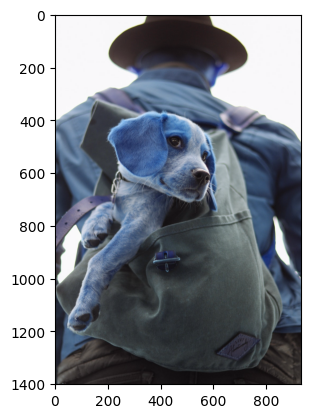
Note: The image appears with incorrect colors because matplotlib expects RGB format, but we're displaying BGR.
Step 2: Converting to RGB
Let's convert the image to RGB format for proper display:
# Convert the image from BGR to RGB
img_rgb = cv2.cvtColor(img, cv2.COLOR_BGR2RGB)
plt.imshow(img_rgb)
plt.show()

Now the image displays with correct colors!
Step 3: Converting to HSV
HSV color space is useful for color-based segmentation and filtering:
# Convert the image from BGR to HSV
img = cv2.cvtColor(img, cv2.COLOR_BGR2HSV)
plt.imshow(img)
plt.show()

Step 4: Converting to HSL
HSL color space is designed to be more intuitive for human perception:
# Convert the image from RGB to HSL
img_hsl = cv2.cvtColor(img_rgb, cv2.COLOR_RGB2HLS)
plt.imshow(img_hsl)
plt.show()

Key Differences Between Color Spaces
RGB Color Space
- Pros: Most common, hardware-friendly, direct color representation
- Cons: Not intuitive for human perception, difficult for color-based segmentation
- Use Cases: Display, storage, general image processing
HSV Color Space
- Pros: Intuitive for color-based operations, separates color from brightness
- Cons: Not hardware-friendly, complex calculations
- Use Cases: Color detection, image segmentation, filtering
HSL Color Space
- Pros: Most intuitive for human perception, separates lightness from color
- Cons: Not hardware-friendly, complex calculations
- Use Cases: Color pickers, UI design, human-centric applications
Common Conversion Functions
# BGR to RGB
rgb = cv2.cvtColor(bgr, cv2.COLOR_BGR2RGB)

# BGR to HSV
hsv = cv2.cvtColor(bgr, cv2.COLOR_BGR2HSV)

# BGR to HSL
hsl = cv2.cvtColor(bgr, cv2.COLOR_BGR2HLS)

# RGB to HSV
hsv = cv2.cvtColor(rgb, cv2.COLOR_RGB2HSV)

# RGB to HSL
hsl = cv2.cvtColor(rgb, cv2.COLOR_RGB2HLS)

# HSV to RGB
rgb = cv2.cvtColor(hsv, cv2.COLOR_HSV2RGB)

# HSL to RGB
rgb = cv2.cvtColor(hsl, cv2.COLOR_HLS2RGB)
Complete Code Example
Here's the complete code from this tutorial:
import cv2
import numpy as np
from matplotlib import pyplot as plt

# Read the image in BGR mode
img = cv2.imread('Assets/dog_backpack.jpg')
plt.imshow(img)
plt.show()

# Convert the image from BGR to RGB
img_rgb = cv2.cvtColor(img, cv2.COLOR_BGR2RGB)
plt.imshow(img_rgb)
plt.show()

# Convert the image from BGR to HSV
img = cv2.cvtColor(img, cv2.COLOR_BGR2HSV)
plt.imshow(img)
plt.show()

# Convert the image from RGB to HSL
img_hsl = cv2.cvtColor(img_rgb, cv2.COLOR_RGB2HLS)
plt.imshow(img_hsl)
plt.show()
Note:
Understanding color spaces is fundamental for computer vision and image processing. Each color space has its strengths, and choosing the right one can significantly improve your results.