Proforma and Actual Price Calculator
The Proforma and Actual Price Calculator is a sophisticated feature in the Iron Ore Procurement System Software, designed to help users calculate and compare proforma and actual prices for iron ore shipments. This tool provides comprehensive price analysis capabilities with chemical analysis integration and custom date range calculations.
1. Calculation Types
The calculator supports two main calculation types:
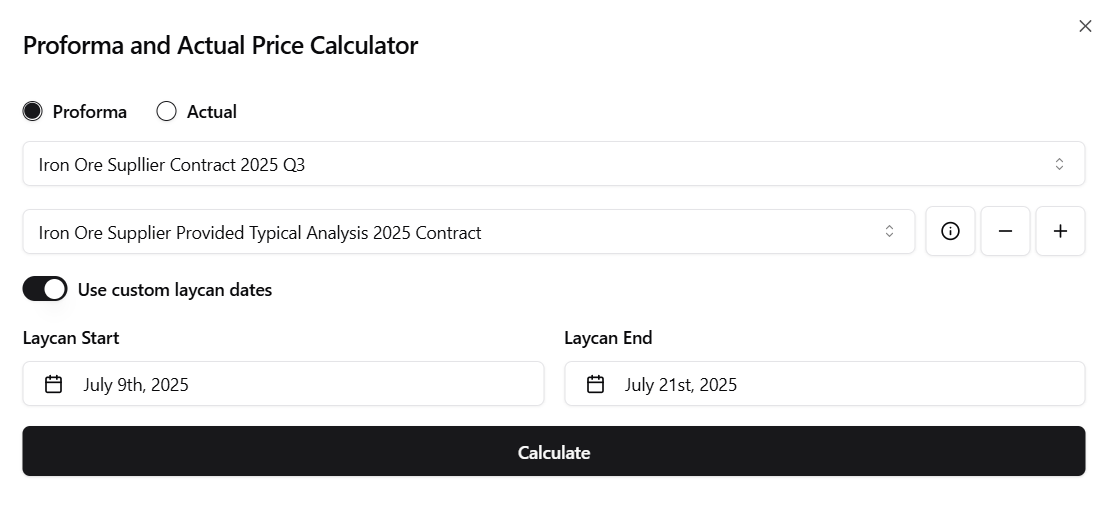
Proforma Calculation
- Calculates prices based on proforma data and typical iron ore spec
- Used for Letter of Credit (LC) opening
- Helps determine initial LC value based on estimated specifications
- Enables financial teams to allocate appropriate funds for procurement
- Provides a baseline price for contract negotiations and budgeting
Actual Calculation
- Calculates prices based on actual shipment data and final specifications
- Uses confirmed pricing and delivery information
- Essential for final cost analysis
2. Contract Selection
Users can select from a comprehensive list of shipments with detailed information:
- Contract Name: The iron ore supplier name and contract details after successful negotiations and agreement signing. Each contract contains unique pricing formulas incorporating factors like:
- Premium/discount rates based on Fe content
- Quality penalties for impurities
- Market index adjustments
- Special conditions negotiated between parties
- Laycan Range: The delivery period (start and end dates)
- Proforma Price: The estimated price per metric tonne
- Actual Price: The final confirmed price per metric tonne
- Wet Metric Tonnes: The quantity of iron ore in wet metric tonnes
- Dry Metric Tonnes: The quantity of iron ore in dry metric tonnes (moisture content removed)-
- Penalty: Any applicable penalties or adjustments
3. Price Calculation Formula
The calculator applies specific formulas based on the selected contract type and parameters:
Base Formula Components
- Fe Content Adjustment: For example:
(Actual Fe% - Base Fe%) × Fe Premium - Impurity Penalties: Calculated for elements like Silica, Alumina, Phosphorus etc.
- Market Index: Average of daily Platts/MB prices within the calculation period
- Freight Adjustment: Based on C3 route rates for the period
Formula Application
The system automatically:
- Retrieves daily price data from the Assets Price Archive for the selected period
- Applies the contract-specific formula incorporating:
- Base price adjustments
- Fe content premiums/discounts
- Quality parameters
- Freight rates
- Calculates final price per DMT (Dry Metric Tonne)

Note:
The formula parameters and coefficients are contract-specific and configured during contract setup. The system ensures all price components are properly weighted according to the contract terms.
Note:
All values shown in the screenshots and examples are dummy data used to demonstrate functionality. They do not represent actual market prices or historical data.
This selection allows users to focus on specific shipments and analyze their pricing details.
4. Chemical Analysis Integration
The calculator includes advanced chemical analysis capabilities:
Chemical Analysis Selection
- Choose from existing laboratory analysis records
- Select "Default" for standard analysis parameters
- View detailed chemical composition data for selected analysis
Chemical Analysis Management
- View Details: Access comprehensive chemical analysis information
- Delete Analysis: Remove outdated or incorrect analysis records
- Create New Analysis: Add new laboratory results with detailed specifications
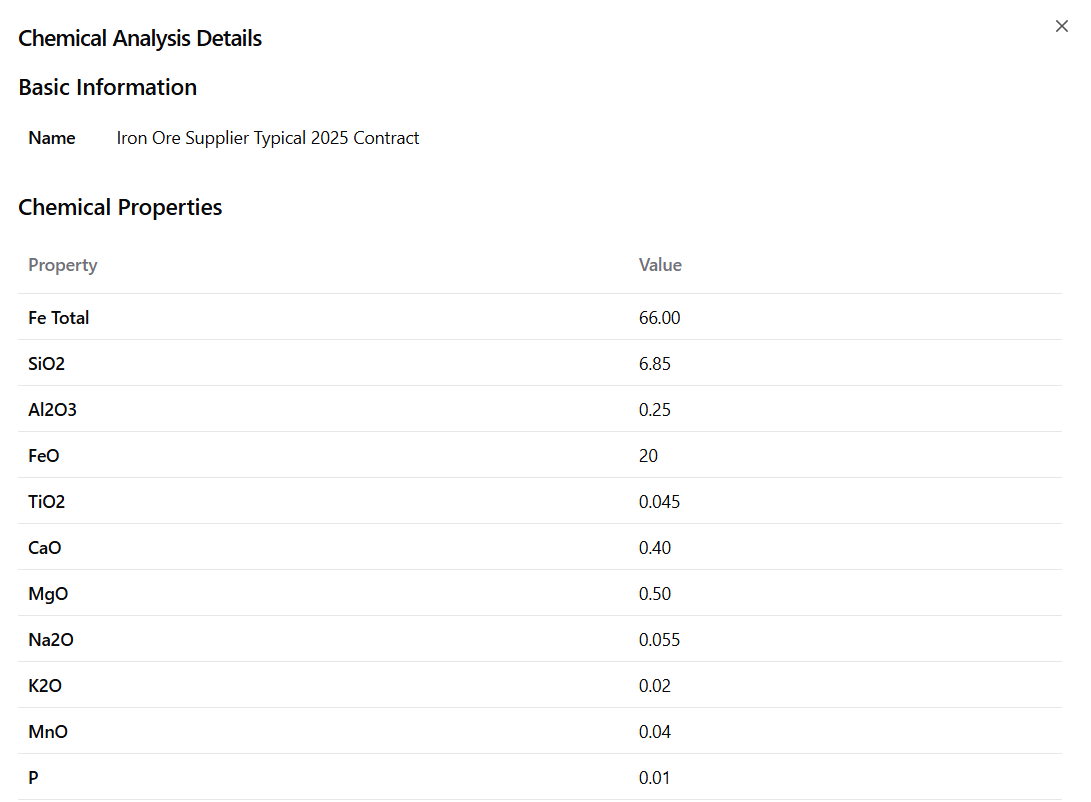
This integration ensures that price calculations account for the actual chemical composition of the iron ore, providing more accurate and reliable results.
5. Custom Date Range Calculation
The system automatically calculates prices based on laycan dates (Lay/Can or Laytime Cancelling) which define the loading window for each shipment. When a user changes the laycan dates, the system:
-
For Proforma Invoice:
- Uses a calculation period starting from LC opening date
- Averages market prices according to contract terms
- Provides provisional pricing for contract execution
-
For Final Invoice:
- Uses actual laycan dates as the basis
- Calculates final price using loading period averages
- Adjusts for any quality variations from lab results
Users can easily override these default periods by specifying custom date ranges, allowing them to:
- Test different pricing scenarios
- Account for contract-specific calculation periods
- Compare provisional vs final prices
- Calculate price adjustments for early/late loadings
Date Range Features
- Toggle Custom Dates: Enable/disable custom date range calculation
- Start Date Selection: Choose the beginning of the calculation period
- End Date Selection: Choose the end of the calculation period
- Mobile-Friendly: Responsive date picker for mobile devices
This flexibility allows users to analyze pricing scenarios with different delivery timeframes and market conditions.
6. Calculation Results
The calculator provides comprehensive pricing analysis including:
Core Price Components
- Actual Fe Proforma Price: Price per percentage of iron content
- Asset Fe Average: Benchmark price based on Fe index
- Per Percent Fe Average: Average price per percentage point of iron content
- Freight C3: Transportation costs (C3 route)
- Premium: Quality premium or discount
- Penalty Cost: Additional costs or deductions
Final Calculations
- Total Price Amount: Final price based on dry metric tonnage
- Proforma Percentage Tolerance: Tolerance calculation for proforma pricing
- Quotation Period: Start and end dates for the price quotation
7. User Interface Features
Responsive Design
- Desktop Interface: Full-featured interface with side-by-side components
- Mobile Interface: Optimized layout for mobile devices with dialog-based date pickers
- Adaptive Layout: Automatically adjusts based on screen size
Interactive Elements
- Radio Buttons: Easy switching between proforma and actual calculations
- Dropdown Menus: Intuitive selection of shipments and chemical analyses
- Toggle Switches: Simple enable/disable for custom date ranges
- Action Buttons: Clear visual indicators for different operations
8. Data Management
Laboratory Records
- Fetch Lab Records: Retrieve all available chemical analysis records
- Create New Records: Add new laboratory analysis with detailed specifications
- Delete Records: Remove outdated or incorrect analysis data
- View Details: Access comprehensive chemical composition information
9. Export and Reporting
The calculator supports data export and reporting capabilities:
Export Features
- Calculation Results: Export detailed calculation breakdowns
- Chemical Analysis: Include chemical composition data in exports
- Date Ranges: Export calculations for specific time periods
- Multiple Formats: Support for various export formats

Note:
All values shown in the screenshots and examples are dummy data used to demonstrate functionality. They do not represent actual market prices or historical data.
The Proforma and Actual Price Calculator thus provides a comprehensive and sophisticated tool for iron ore price analysis, supporting informed decision-making in procurement activities while ensuring accuracy and transparency in pricing calculations.